Lulu Ledger vs. AgentXpense
Both products connect clients, deals, commissions, expenses, and reports. Lulu Ledger adds automatic commission calculations plus mileage, tax planning, production goals, and broader performance insights.

Who should choose each product?
Choose Lulu Ledger if…
Choose AgentXpense if…
The most important differences
Entering commission figures vs calculating the breakdown
Lulu Ledger
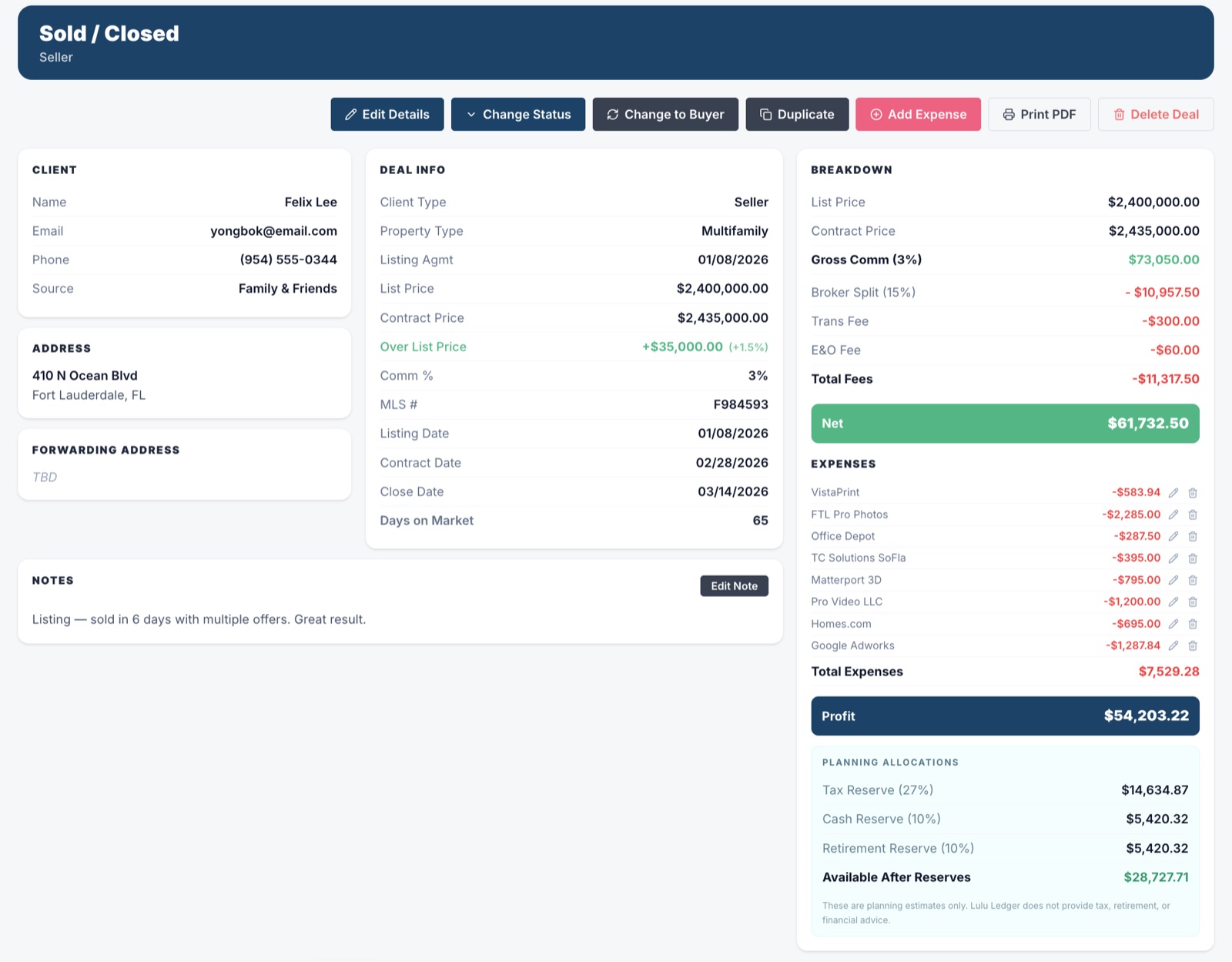
Lulu Ledger calculates the commission breakdown from the deal information entered, including applicable splits and fees, so agents can estimate what a closing may actually produce.
AgentXpense
AgentXpense lets agents record commissions and brokerage deductions for a deal. According to its published product information, these figures are entered by the agent rather than calculated automatically from commission percentages, brokerage splits, or cap thresholds.
Vehicle expenses vs dedicated mileage tracking
Lulu Ledger
Lulu Ledger includes dedicated mileage tracking and calculates the potential deduction using the IRS mileage rate applicable to the date of the trip.
AgentXpense
AgentXpense provides a vehicle-expense category, but its published materials do not describe a GPS mileage tracker, trip log, or automatic per-mile deduction calculator.
Bookkeeping records vs broader business planning
Lulu Ledger
Lulu Ledger adds estimated tax planning, production-goal tracking, and insights across deals, income, expenses, mileage, and overall performance.
AgentXpense
AgentXpense connects deals, commissions, deductions, expenses, receipts, and reports.
Lulu Ledger vs AgentXpense at a glance
| Capability | Lulu Ledger | AgentXpense |
|---|---|---|
| Designed specifically for real estate | ✓ Yes | ✓ Yes |
| Deal pipeline and deal-level financial tracking | ✓ Deals move through a real-estate-focused pipeline with income and expenses connected to each deal | ✓ Supports Active, Pending, and Closed deal stages with deal-level income and expenses |
| Commission tracking and automatic commission breakdowns | ✓ Calculates commissions, splits, and applicable fees from the deal terms entered | Commissions are tracked, but published instructions have agents enter the commission and brokerage-deduction figures rather than calculating them from percentages or splits |
| Brokerage deductions and cap-threshold calculations | ✓ Both handled within Lulu Ledger’s commission workflow | Brokerage deductions can be recorded. No automatic cap-threshold calculation is documented. |
| Bank and card synchronization | ✓ Read-only connection through Plaid | ✓ Connection through Plaid |
| Receipt capture and matching | ✓ Upload receipts and receive suggested transaction matches | ✓ Includes AI-assisted receipt scanning |
| Dedicated mileage tracking | ✓ Records trips and calculates mileage deductions using the applicable IRS rate | ✕ No dedicated trip log or per-mile calculator documented; vehicle expenses can be categorized |
| Estimated tax planning | ✓ Yes | Not documented as a current feature |
| Production goals and business-performance insights | ✓ Production-goal tracking plus deal, income, expense, mileage, and performance insights | ✓ Provides deal, commission, expense, and financial reporting. A production-goal tracker is not documented as a current feature. |
| Pre-construction workflow | ✕ Not a dedicated module | ✓ Includes a Pre-Cons workflow with multiple payment tranches |
| Data imports and exports | Bank activity through Plaid and supported Lulu Ledger workflows, with PDF and CSV report exports | ✓ Supports CSV, Excel, and PDF imports, with CSV and printable exports |
| Accounting approach and scope | ✕ Simple cash-basis recordkeeping; no double-entry or accrual accounting, payroll, invoicing, or inventory | ✕ No full double-entry or accrual accounting, payroll, invoicing, or inventory system documented |
| Published subscription price | Founder pricing: $14.99/month or $149/year for qualifying early customers | $14/month or $9.99/month when billed annually |
| Free trial | 14 days with a payment method, $0 charged today | 30 days with no credit card required |
A ✕ in Lulu Ledger’s column is deliberate: it marks things Lulu Ledger intentionally doesn’t do. No tool should win every row of its own comparison.
Enter the deal once. Understand the entire business.
Lulu Ledger’s deal section is more than a transaction list. It keeps the client, contact information, notes, property details, status, dates, commission terms, income, and related costs connected in one workspace.
As the deal progresses, that information updates commission calculations, pipeline reporting, production, estimated taxes, goals, and performance insights. Instead of rebuilding the same story across separate tools, agents can see what is closing, what they may earn, what they may keep, and how the business is performing.
 DEALS · DEAL WORKSPACE · SOLD
 REPORTS · INSIGHTS · YEAR TO DATE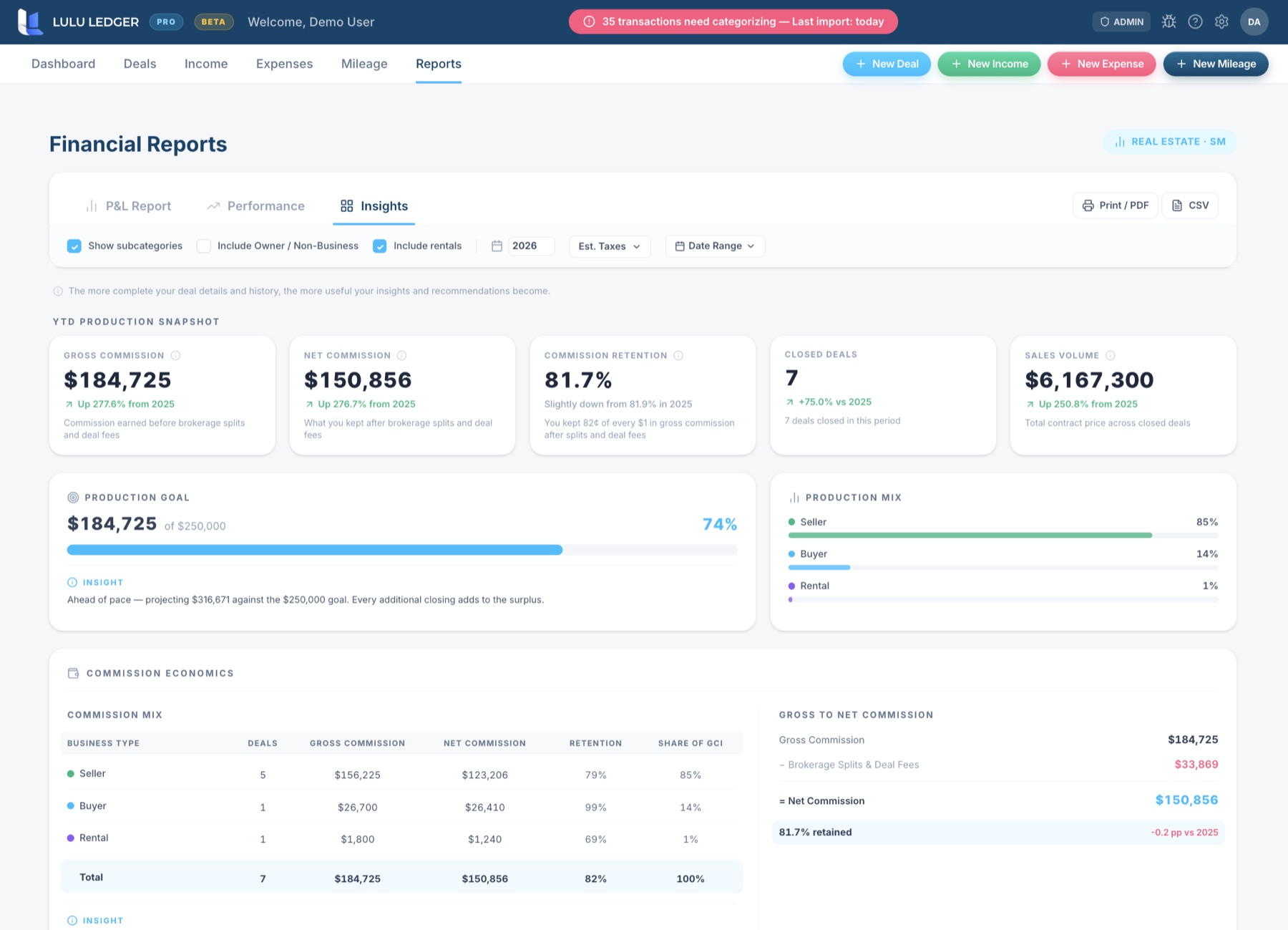
Frequently asked questions
Is AgentXpense designed specifically for real estate professionals?
Yes. AgentXpense is real-estate-specific software for tracking deals, commissions, brokerage deductions, expenses, receipts, bank activity, and reports.
Does AgentXpense calculate brokerage splits automatically?
AgentXpense records commissions and brokerage deductions, but its published instructions describe entering those figures rather than automatically calculating them from commission percentages, brokerage split rules, or cap thresholds.
Does AgentXpense track mileage?
AgentXpense allows vehicle-related expenses to be categorized, but its published materials do not document a dedicated GPS mileage tracker, trip log, or automatic per-mile deduction calculator. Lulu Ledger includes a dedicated mileage workflow and applies the appropriate IRS mileage rate based on the trip date.
Does AgentXpense support pre-construction transactions?
Yes. AgentXpense includes a dedicated Pre-Cons workflow that can track multiple payment tranches. Lulu Ledger does not currently position itself as having a dedicated pre-construction module.
Does Lulu Ledger replace AgentXpense?
It depends on the workflow you need. Both products cover real-estate-specific deal and expense tracking. Lulu Ledger may be a better fit if automatic commission breakdowns, dedicated mileage tracking, estimated tax planning, production goals, and broader performance insights are priorities. AgentXpense may be a better fit if lower pricing, pre-construction workflows, Canadian support, or its import and receipt-scanning tools matter more.
Does either product replace an accountant or tax professional?
No. Both products can help organize financial records, but neither replaces personalized accounting, tax, or legal advice.
Research note: This comparison is based on publicly available product and pricing information. Features, pricing, and offers may change. Confirm current details directly with AgentXpense.
See how every deal connects to every dollar
Track your pipeline, calculate commissions, organize expenses and mileage, plan for taxes, and understand what you may actually keep.