Lulu Ledger vs. FreshBooks
FreshBooks is built around clients, invoices, and service projects. Lulu Ledger is built around closings, commissions, splits, referrals, and real estate business performance.

Who should choose each product?
Choose Lulu Ledger if…
Choose FreshBooks if…
Three questions decide it.
The same three lenses we apply to every tool—including our own.
How does the business earn revenue?
Lulu Ledger
Lulu Ledger assumes income is driven by listings, buyer transactions, rentals, referrals, and commissions. The deal is the organizing record.
FreshBooks
FreshBooks is primarily organized around clients, invoices, payments, time, and projects—a strong fit for businesses that bill customers directly.
How are commissions handled?
Lulu Ledger
Commissions, brokerage splits, transaction fees, referral-related amounts, deal expenses, and results are native components of the deal workflow.
FreshBooks
FreshBooks markets its product to real estate businesses and describes commission-calculation and agent-payout capabilities. Those capabilities sit within a broader accounting and client-billing platform rather than a dedicated real estate pipeline.
Which product is broader?
Lulu Ledger
Lulu Ledger intentionally stays focused on real estate bookkeeping, deals, mileage, planning, and performance.
FreshBooks
FreshBooks is stronger for invoicing, online payments, estimates, proposals, retainers, client portals, time tracking, and service-project management.
Lulu Ledger vs. FreshBooks, row by row.
The better choice depends on whether the business bills clients or closes transactions.
| Capability | Lulu Ledger | FreshBooks |
|---|---|---|
| Built specifically for real estate agents | ✓ Built for solo agents and small teams | ✕ General software that also markets a real estate use case |
| Real estate deal pipeline | ✓ Built in | ✕ General client and project workflow; no comparable dedicated property pipeline is documented |
| Commission and payout support | ✓ Native deal-level commission, split, fee, referral, and expense workflow | ✓ FreshBooks markets commission-calculation and agent-payout capabilities for real estate businesses |
| Deal/project profitability | ✓ Built around each real estate transaction | ✓ Project profitability is available on eligible higher plans |
| Bank connections | ✓ Read-only connection through Plaid | ✓ Bank connections and transaction imports are available |
| Transaction categorization | ✓ User-reviewed categorization with recurring rules | ✓ Expense categorization and bank-reconciliation tools are available; features vary by plan |
| Receipts | ✓ Receipt upload with suggested transaction matches | ✓ Receipt capture and expense organization are available |
| Mileage | ✓ User-entered trips with the applicable IRS rate | ✓ Automatic mobile mileage tracking is available |
| Reports | ✓ Cash-basis P&L, Performance, and Insights, with PDF/print and CSV output | ✓ Accounting and financial reports vary by plan; double-entry reports begin on eligible paid tiers |
| Invoicing and payments | ✕ Outside Lulu Ledger’s scope | ✓ Core strength, including invoices and online payments |
| Time tracking and client projects | ✕ Outside Lulu Ledger’s scope | ✓ Core strength |
| Full accounting and accountant access | ✕ Not a full general-ledger system | ✓ Available on eligible plans |
| Best fit | Commission-based real estate businesses | Service businesses organized around clients, invoices, time, and projects |
| Regular pricing | Founder pricing: $14.99/month or $149/year | Lite $23/month, Plus $43/month, and Premium $70/month before temporary promotions |
A ✕ in Lulu Ledger’s column is deliberate: it marks things Lulu Ledger intentionally doesn’t do. No tool should win every row of its own comparison.
Enter the deal once. Understand the entire business.
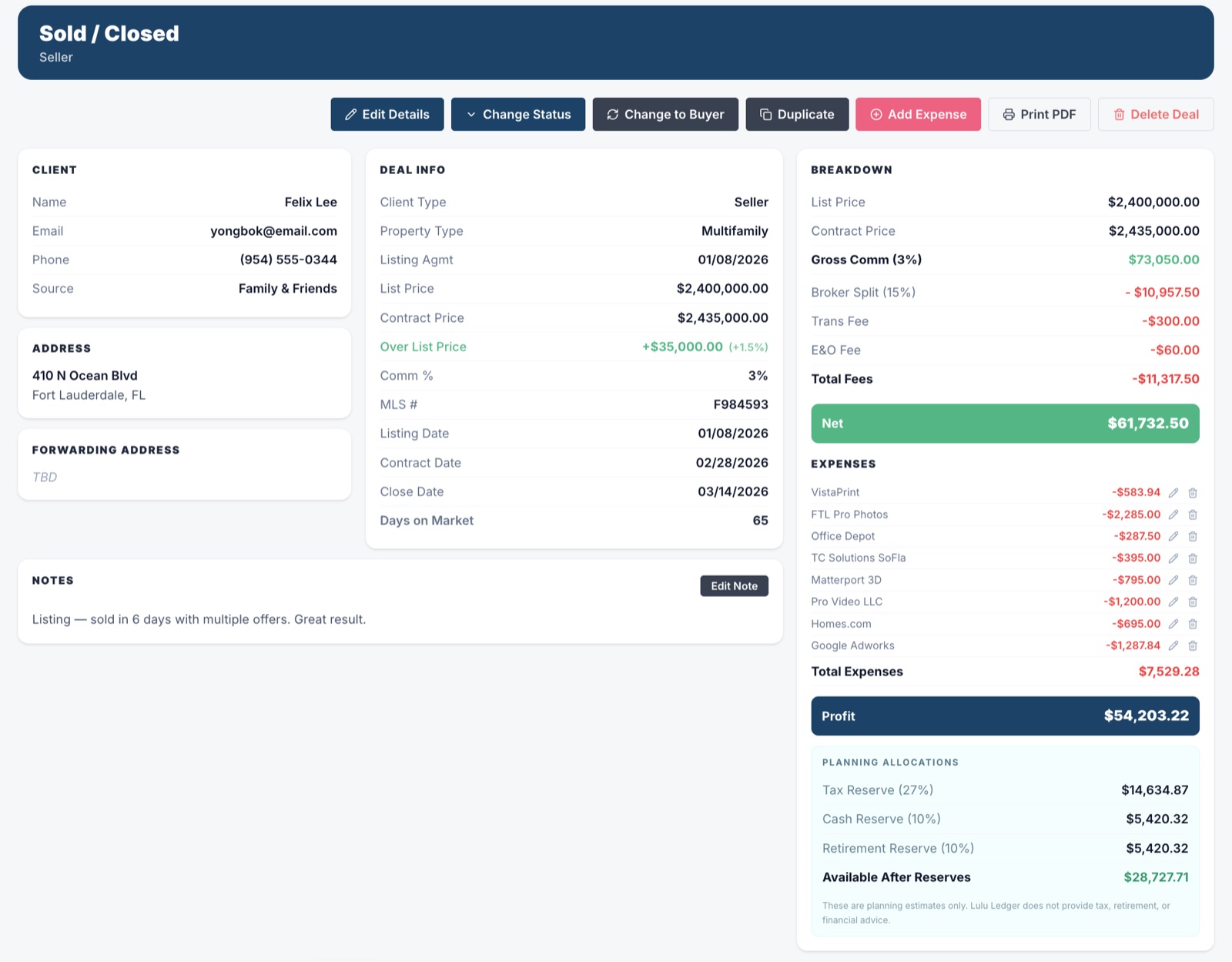
Lulu Ledger’s deal section is more than a transaction list. It keeps the client, contact information, notes, property details, status, dates, commission terms, income, and related costs connected in one workspace.
As the deal progresses, that information updates commission calculations, pipeline reporting, production, estimated taxes, goals, and performance insights. Instead of rebuilding the same story across separate tools, agents can see what is closing, what they may earn, what they may keep, and how the business is performing.
 DEALS · DEAL WORKSPACE · SOLD
 REPORTS · INSIGHTS · YEAR TO DATE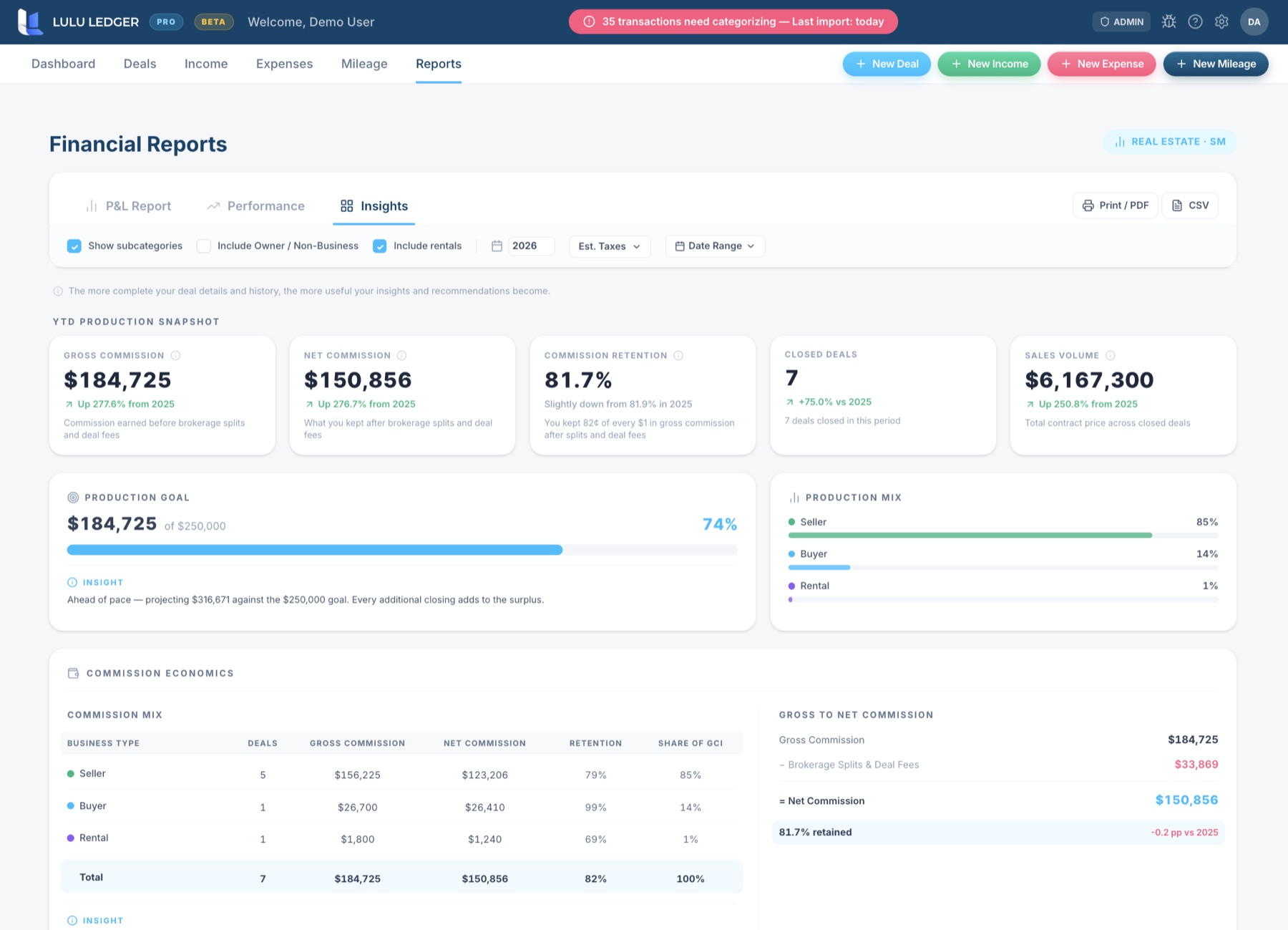
Lulu Ledger vs. FreshBooks: FAQ
Is FreshBooks good for real estate agents?
It can be. FreshBooks markets directly to real estate businesses and provides expense, mileage, invoicing, payment, project, and accounting tools. It may be especially useful when an agent or real estate business bills clients directly or manages service projects.
Does FreshBooks track real estate commissions?
FreshBooks states that its real estate offering can help with commission calculations and agent payouts. Lulu Ledger makes commissions, brokerage splits, fees, referrals, related expenses, and results part of the core property-based deal workflow.
What is the main difference between FreshBooks and Lulu Ledger?
FreshBooks begins with clients, invoices, payments, time, and projects. Lulu Ledger begins with the real estate deal and follows the money from expected commission through brokerage deductions, expenses, reserves, and business performance.
When might FreshBooks be the better choice?
FreshBooks may be the better choice when invoicing, payment collection, estimates, proposals, retainers, client portals, time tracking, or service-project management are central to the business.
Does Lulu Ledger replace FreshBooks?
It can replace the bookkeeping and business-performance workflow for commission-based agents who do not rely on FreshBooks’ invoicing, payment, time-tracking, or client-project tools. It is not intended to replace those broader service-business functions.
Research note: This comparison is based on publicly available product and pricing information. Features, pricing, and offers may change. Confirm current details directly with FreshBooks.
The fastest comparison is trying it.
Full product, free for 14 days. Your own deals, your own numbers.