Lulu Ledger vs. Cashflowy
Cashflowy brings automated bookkeeping, forecasting, AI, and human support. Lulu Ledger brings a dedicated real estate deal workflow at a lower published price.

Who should choose each product?
Choose Lulu Ledger if…
Choose Cashflowy if…
The most important differences
Bookkeeping-first vs deal-first
Lulu Ledger
Lulu Ledger begins with the real estate deal. It tracks the transaction through the pipeline, calculates the expected commission breakdown, and connects the resulting income, fees, expenses, receipts, and mileage to that deal.
Cashflowy
Cashflowy begins with the business’s financial activity. It reconciles transactions, tracks income and expenses, estimates tax reserves, and helps the owner decide what may be available to pay themselves.
Financial guidance vs transaction management
Lulu Ledger
Lulu Ledger focuses more deeply on real estate transaction management, including deal stages, commission calculations, brokerage splits and fees, transaction-related expenses, production goals, and deal-performance insights.
Cashflowy
Cashflowy provides Clara AI, a 90-day forecast, owner-pay guidance, tax-reserve planning, and access to human bookkeepers.
Included services vs a lower-cost self-managed system
Lulu Ledger
Lulu Ledger is a lower-cost software platform designed for agents who want to organize and understand their own business records. It does not currently include a human bookkeeper, invoicing, or an AI financial coach.
Cashflowy
Cashflowy includes automated bookkeeping, AI guidance, and access to human bookkeepers in its subscription.
Lulu Ledger vs Cashflowy at a glance
| Capability | Lulu Ledger | Cashflowy |
|---|---|---|
| Primary audience | Real estate agents and small real estate teams | U.S. service solopreneurs, with a real-estate-focused experience |
| Deal pipeline and deal-level financial tracking | ✓ Manages deals through real-estate-specific stages, with income and expenses connected to individual deals | ✕ No dedicated property or transaction pipeline documented; financial activity is organized through the bookkeeping system |
| Commission take-home calculations | ✓ Calculates commissions, brokerage splits, fees, and estimated deal results | ✓ Provides a “What’s Actually Yours” commission and owner-pay calculation workflow |
| Bank reconciliation | ✓ Read-only bank and card connections through Plaid with transaction review | ✓ Automated bank reconciliation through read-only Plaid connections |
| Expense and receipt management | ✓ Expense tracking and categorization, with receipt uploads and suggested transaction matches | ✓ Expense tracking and categorization with receipt capture and matching |
| Dedicated mileage tracking | ✓ Records business trips and calculates mileage deductions using the applicable IRS rate | ✕ No dedicated trip-based mileage tracker or per-mile deduction calculator documented |
| Estimated tax planning | ✓ Estimated taxes based on Lulu Ledger financial data and settings | ✓ Continuously updated estimated Tax Reserve based on bookkeeping and allocation settings |
| Owner-pay and reserve planning | ✓ Planning allocations set aside tax, cash, and retirement reserves from each deal’s profit and show what is available after reserves | ✓ Dedicated Owner’s Pay calculator |
| Cash-flow forecasting | ✕ No dedicated forward-looking cash-flow forecast currently offered | ✓ Includes a 90-day financial forecast |
| Production goals and performance insights | ✓ Production-goal tracking plus deal, income, expense, mileage, and performance insights | Provides broader financial insights, profit trends, and business-health guidance. A real-estate production-goal tracker is not documented. |
| AI guidance and human-bookkeeper support | ✕ Neither an AI financial coach nor bookkeeping services are currently included | ✓ Clara AI financial coach, with human bookkeeper access included in the subscription |
| Invoicing and billing | ✕ No | ✓ Yes |
| Accounting approach | Simple cash-basis recordkeeping and financial reporting; not a double-entry accounting system | Offers a more accounting-oriented bookkeeping system with accountant-ready financial records |
| Published subscription price | Founder pricing: $14.99/month or $149/year for qualifying early customers | $39/month or $390/year |
| Free trial and refund protection | 14 days with a payment method and $0 charged today, plus a 30-day money-back guarantee on the first payment | 7 days with $0 charged at signup, plus an advertised 30-day money-back guarantee |
A ✕ in Lulu Ledger’s column is deliberate: it marks things Lulu Ledger intentionally doesn’t do. No tool should win every row of its own comparison.
Enter the deal once. Understand the entire business.
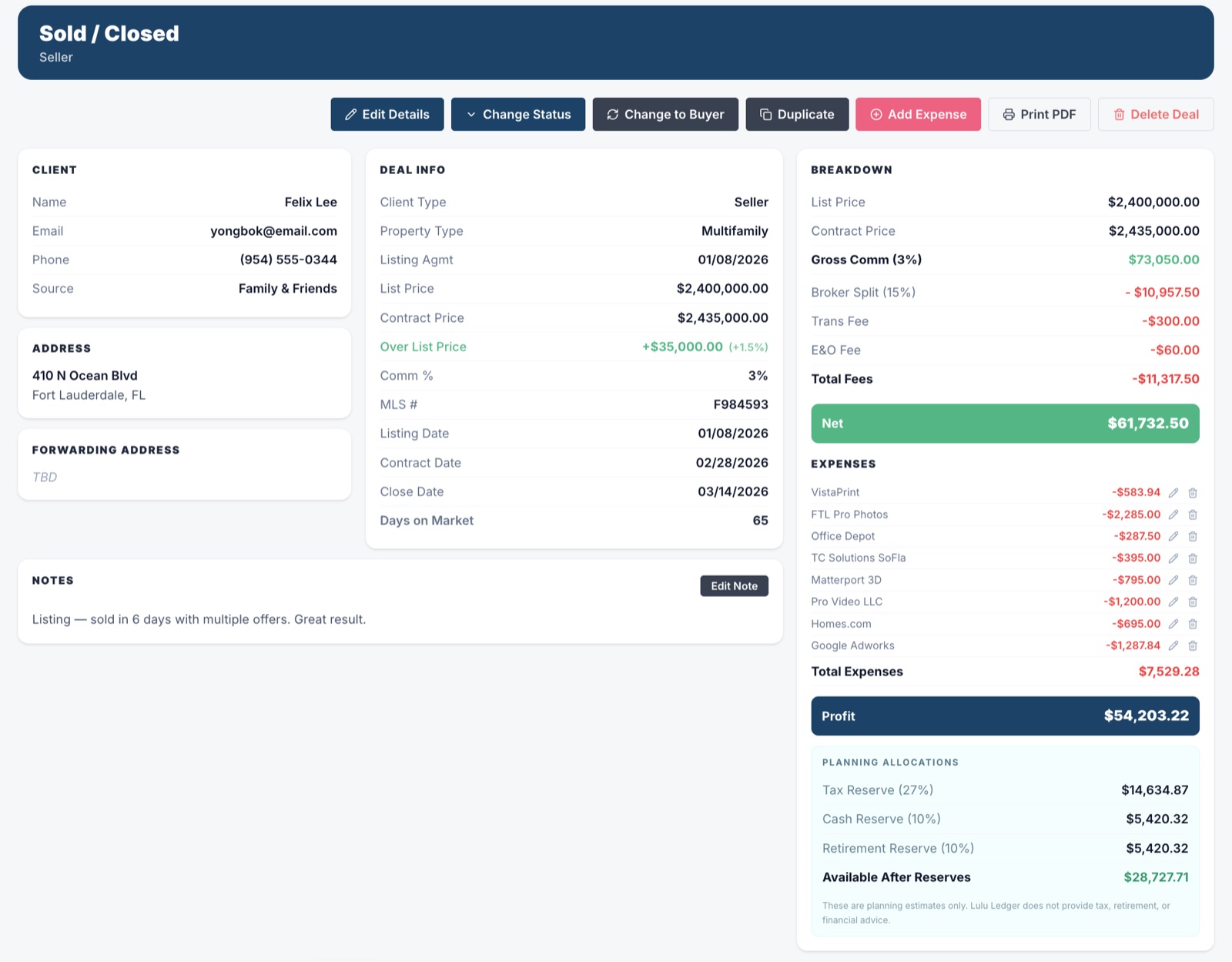
Lulu Ledger’s deal section is more than a transaction list. It keeps the client, contact information, notes, property details, status, dates, commission terms, income, and related costs connected in one workspace.
As the deal progresses, that information updates commission calculations, pipeline reporting, production, estimated taxes, goals, and performance insights. Instead of rebuilding the same story across separate tools, agents can see what is closing, what they may earn, what they may keep, and how the business is performing.
 DEALS · DEAL WORKSPACE · SOLD
 REPORTS · INSIGHTS · YEAR TO DATE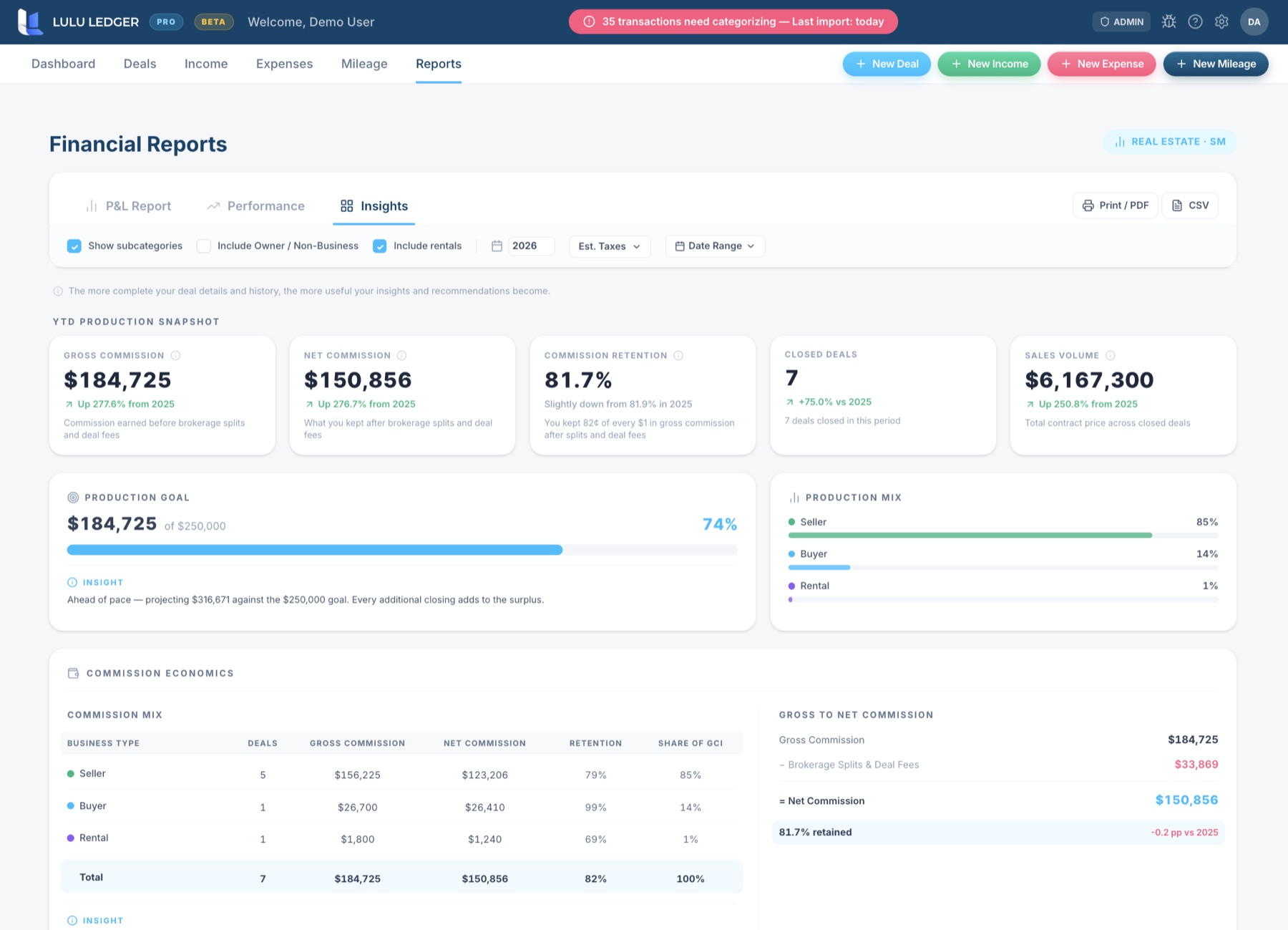
Frequently asked questions
Is Cashflowy designed specifically for real estate agents?
Cashflowy offers a real-estate-focused experience and markets directly to real estate agents. Its underlying platform is designed more broadly for U.S.-based service solopreneurs. Lulu Ledger is organized specifically around real estate deals, commissions, expenses, mileage, and production.
Does Cashflowy track real estate deals?
Cashflowy helps agents calculate commission take-home and manage the resulting financial activity, but its published materials do not document a dedicated property-based pipeline for managing active, pending, and closed transactions. Lulu Ledger includes a dedicated real estate deal pipeline.
Does Cashflowy calculate what an agent may keep from a commission?
Yes. Cashflowy provides a “What’s Actually Yours” workflow and owner-pay guidance that account for items such as splits, fees, expenses, and tax reserves. Lulu Ledger also estimates what an agent may keep, but performs the calculation within the individual real estate deal and pipeline workflow: planning allocations set aside tax, cash, and retirement reserves from each deal’s profit and show what is available after those reserves.
Does Cashflowy include a human bookkeeper?
Yes. Cashflowy states that access to human bookkeepers is included in its subscription. Lulu Ledger does not currently include bookkeeping services or access to a human bookkeeper.
Does Cashflowy track business mileage?
Cashflowy’s published feature materials do not document a dedicated trip-based mileage tracker or automatic per-mile deduction calculator. Lulu Ledger includes a dedicated mileage workflow and uses the applicable IRS mileage rate based on the date of each trip.
Does Lulu Ledger replace Cashflowy?
It depends on what you need. Lulu Ledger may be the better fit for an agent who prioritizes a dedicated deal pipeline, commission calculations, transaction-level results, mileage, and production tracking. Cashflowy may be the better fit for someone who prioritizes automated bookkeeping, forecasting, invoicing, AI guidance, and access to human bookkeepers.
Does either product replace an accountant or tax professional?
No. Both products can organize records and provide educational financial estimates, but neither replaces personalized accounting, tax, or legal advice.
Research note: This comparison is based on publicly available product and pricing information. Features, pricing, and offers may change. Confirm current details directly with Cashflowy.
See how every deal connects to every dollar
Track your pipeline, calculate commissions, organize expenses and mileage, plan for taxes, and understand what you may actually keep.